Add-on Lite Vehicles Spawner V1



8
0
8
0
ADD-ON LITE VEHICLES SPAWNER v1.1
Developed by: Eren
Are you tired of heavy, bloated vehicle spawners that lag your game or fail to load high-poly addon models? ADD-ON LITE is a high-performance, C#-based script designed for speed, simplicity, and 100% customization.
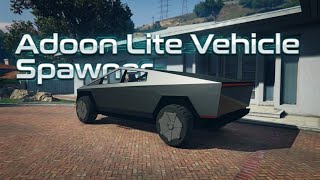
Whether you are spawning a simple Zentorno or a high-detail Cybertruck, this mod handles the memory requests efficiently to ensure a successful spawn every time.
🚀 Key Features
Ultra-Lite Engine: Optimized C# code that won't impact your FPS.
Dynamic .ini System: Add or remove cars instantly without ever touching the code.
Smart Loading: Built-in "Wait Loops" to ensure heavy addon models load properly before spawning.
Clean UI: Minimalist subtitle menu that stays out of the way of your gameplay.
Professional Feedback: Color-coded notifications (Green for success, Red for errors) so you know exactly what’s happening.
📋 Requirements
Game Version: Compatible with ALL game versions
Script Hook V
Script Hook V .NET:
Note: This is a .dll script. It requires a scripts folder in your main GTA V directory.
🛠 Installation
Ensure you have ScriptHookV and ScriptHookVDotNet installed.
Drag and drop AddonLiteSpawner.dll and MySpawner.ini into your scripts folder.
(Optional) Open MySpawner.ini with Notepad to add your own custom addon spawn names!
🎮 How to Use
Open Menu: Press F10
Navigate: Use UP / DOWN arrows
Spawn Vehicle: Press ENTER
Signature: Look for the "By Eren" notification to confirm the script is active!
⚠️ Note for Add-On Users
This spawner is a tool. To spawn custom cars you must have the vehicle's OIV/Add-on files installed in your dlclist.xml first. Simply add the model name to the .ini file and you’re ready to go!
Developed by: Eren
Are you tired of heavy, bloated vehicle spawners that lag your game or fail to load high-poly addon models? ADD-ON LITE is a high-performance, C#-based script designed for speed, simplicity, and 100% customization.
Whether you are spawning a simple Zentorno or a high-detail Cybertruck, this mod handles the memory requests efficiently to ensure a successful spawn every time.
🚀 Key Features
Ultra-Lite Engine: Optimized C# code that won't impact your FPS.
Dynamic .ini System: Add or remove cars instantly without ever touching the code.
Smart Loading: Built-in "Wait Loops" to ensure heavy addon models load properly before spawning.
Clean UI: Minimalist subtitle menu that stays out of the way of your gameplay.
Professional Feedback: Color-coded notifications (Green for success, Red for errors) so you know exactly what’s happening.
📋 Requirements
Game Version: Compatible with ALL game versions
Script Hook V
Script Hook V .NET:
Note: This is a .dll script. It requires a scripts folder in your main GTA V directory.
🛠 Installation
Ensure you have ScriptHookV and ScriptHookVDotNet installed.
Drag and drop AddonLiteSpawner.dll and MySpawner.ini into your scripts folder.
(Optional) Open MySpawner.ini with Notepad to add your own custom addon spawn names!
🎮 How to Use
Open Menu: Press F10
Navigate: Use UP / DOWN arrows
Spawn Vehicle: Press ENTER
Signature: Look for the "By Eren" notification to confirm the script is active!
⚠️ Note for Add-On Users
This spawner is a tool. To spawn custom cars you must have the vehicle's OIV/Add-on files installed in your dlclist.xml first. Simply add the model name to the .ini file and you’re ready to go!
Zuerst hochgeladen: 16. März 2026
Letztes Update: 3 hours ago
Last Downloaded: 1 hour ago
0 Kommentare
ADD-ON LITE VEHICLES SPAWNER v1.1
Developed by: Eren
Are you tired of heavy, bloated vehicle spawners that lag your game or fail to load high-poly addon models? ADD-ON LITE is a high-performance, C#-based script designed for speed, simplicity, and 100% customization.
Whether you are spawning a simple Zentorno or a high-detail Cybertruck, this mod handles the memory requests efficiently to ensure a successful spawn every time.
🚀 Key Features
Ultra-Lite Engine: Optimized C# code that won't impact your FPS.
Dynamic .ini System: Add or remove cars instantly without ever touching the code.
Smart Loading: Built-in "Wait Loops" to ensure heavy addon models load properly before spawning.
Clean UI: Minimalist subtitle menu that stays out of the way of your gameplay.
Professional Feedback: Color-coded notifications (Green for success, Red for errors) so you know exactly what’s happening.
📋 Requirements
Game Version: Compatible with ALL game versions
Script Hook V
Script Hook V .NET:
Note: This is a .dll script. It requires a scripts folder in your main GTA V directory.
🛠 Installation
Ensure you have ScriptHookV and ScriptHookVDotNet installed.
Drag and drop AddonLiteSpawner.dll and MySpawner.ini into your scripts folder.
(Optional) Open MySpawner.ini with Notepad to add your own custom addon spawn names!
🎮 How to Use
Open Menu: Press F10
Navigate: Use UP / DOWN arrows
Spawn Vehicle: Press ENTER
Signature: Look for the "By Eren" notification to confirm the script is active!
⚠️ Note for Add-On Users
This spawner is a tool. To spawn custom cars you must have the vehicle's OIV/Add-on files installed in your dlclist.xml first. Simply add the model name to the .ini file and you’re ready to go!
Developed by: Eren
Are you tired of heavy, bloated vehicle spawners that lag your game or fail to load high-poly addon models? ADD-ON LITE is a high-performance, C#-based script designed for speed, simplicity, and 100% customization.
Whether you are spawning a simple Zentorno or a high-detail Cybertruck, this mod handles the memory requests efficiently to ensure a successful spawn every time.
🚀 Key Features
Ultra-Lite Engine: Optimized C# code that won't impact your FPS.
Dynamic .ini System: Add or remove cars instantly without ever touching the code.
Smart Loading: Built-in "Wait Loops" to ensure heavy addon models load properly before spawning.
Clean UI: Minimalist subtitle menu that stays out of the way of your gameplay.
Professional Feedback: Color-coded notifications (Green for success, Red for errors) so you know exactly what’s happening.
📋 Requirements
Game Version: Compatible with ALL game versions
Script Hook V
Script Hook V .NET:
Note: This is a .dll script. It requires a scripts folder in your main GTA V directory.
🛠 Installation
Ensure you have ScriptHookV and ScriptHookVDotNet installed.
Drag and drop AddonLiteSpawner.dll and MySpawner.ini into your scripts folder.
(Optional) Open MySpawner.ini with Notepad to add your own custom addon spawn names!
🎮 How to Use
Open Menu: Press F10
Navigate: Use UP / DOWN arrows
Spawn Vehicle: Press ENTER
Signature: Look for the "By Eren" notification to confirm the script is active!
⚠️ Note for Add-On Users
This spawner is a tool. To spawn custom cars you must have the vehicle's OIV/Add-on files installed in your dlclist.xml first. Simply add the model name to the .ini file and you’re ready to go!
Zuerst hochgeladen: 16. März 2026
Letztes Update: 3 hours ago
Last Downloaded: 1 hour ago
Nimm an der Unterhaltung teil! Melde dich an oder registriere dich um zu kommentieren.
 5mods on Discord
