Original Vespucci Beach Sculpture 2.7

![Wooden Baseball Bat [Replace]](https://img.gta5-mods.com/q75-w500-h333-cfill/images/wooden-baseball-bat-alex106/a7585b-GTA5_2024_09_18_17_20_44_628.png "Wooden Baseball Bat [Replace]")
![Backpack for MP Female & Male [Add-On]](https://img.gta5-mods.com/q75-w500-h333-cfill/images/mp-backpacks/a49f52-GTA5_2024_04_13_12_04_47_911.png "Backpack for MP Female & Male [Add-On]")
4.888
128
4.888
128
Information:
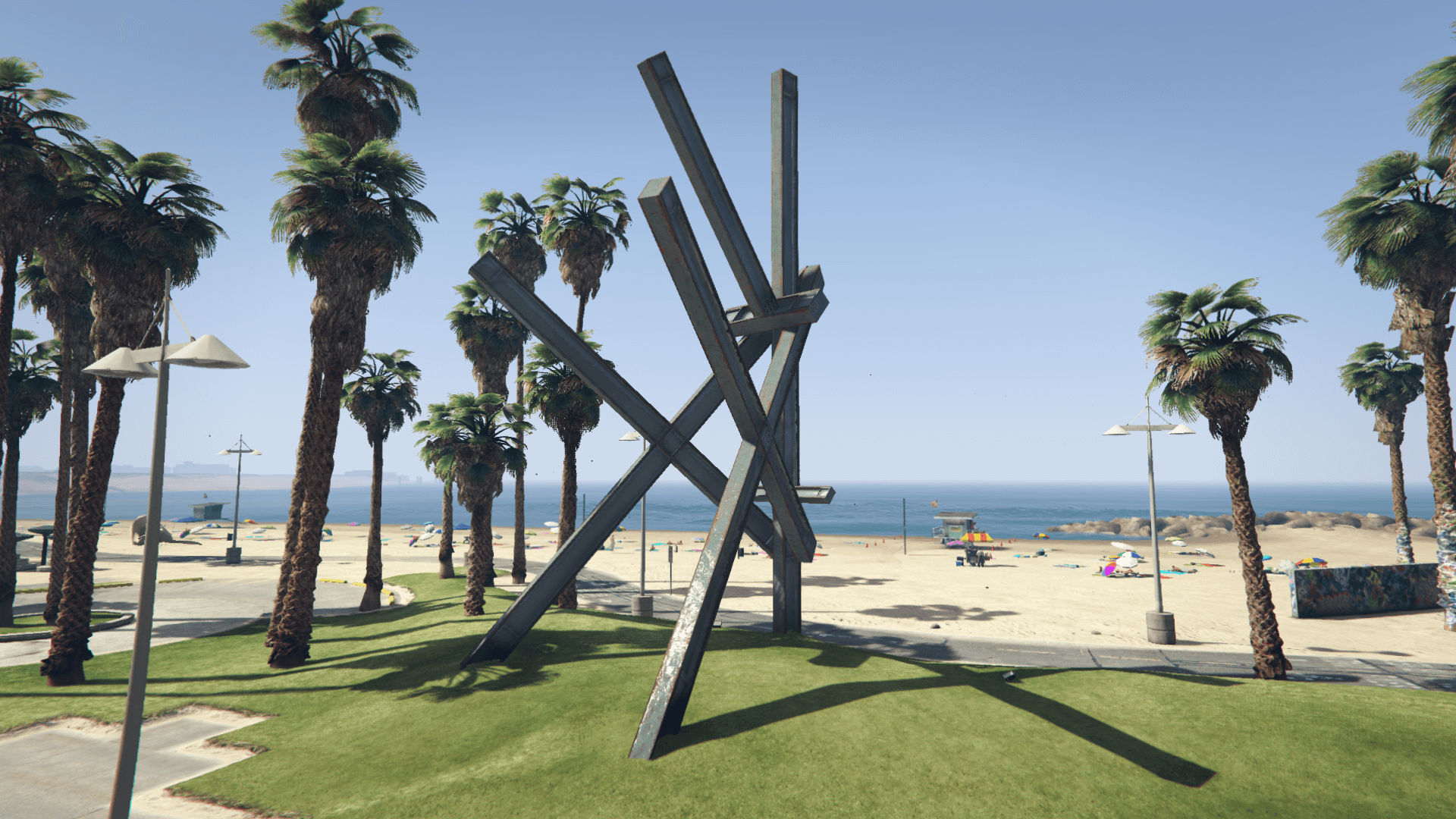
This mod restores the Vespucci Beach sculpture from the PS3 & X360 versions of the game
Requirements:
- Legacy: OpenIV.asi
- Enhanced: OpenRPF
Installation (Legacy):
Move the "spsculpture" folder in "mods\update\x64\dlcpacks" and add "<Item>dlcpacks:/spSculpture/</Item>" to the "dlclist.xml"
- MP Map Files: use the package installer of OpenIV or extract and import the files manually (check the "assembly.xml" for the files paths)
Installation (Enhanced):
Move the "spSculpture_Gen9" folder in "mods\update\x64\dlcpacks" and add "<Item>dlcpacks:/spSculpture_Gen9/</Item>" to the "dlclist.xml"
MP Map Files: check the ReadMe.txt (I am unable to save the description with the file paths here in tthe description as it throws an error whenever trying to save)
Special Thanks:
dexyfex for CodeWalker
Skylumz for Sollumz
Smallo for the YMAP & YBN Mover
The OpenIV Team for OpenIV
koolk for LibertyV
DK22Pac for the WFT/XFT to DFF converter
cj2000 for the R* RW IO for 3DS Max
talkol for the placement_v4.txt file
Changelog:
v2.7:
- Added a version of the mod for the Enhanced edition
- Updated the requirements and installation instructions
This mod restores the Vespucci Beach sculpture from the PS3 & X360 versions of the game
Requirements:
- Legacy: OpenIV.asi
- Enhanced: OpenRPF
Installation (Legacy):
Move the "spsculpture" folder in "mods\update\x64\dlcpacks" and add "<Item>dlcpacks:/spSculpture/</Item>" to the "dlclist.xml"
- MP Map Files: use the package installer of OpenIV or extract and import the files manually (check the "assembly.xml" for the files paths)
Installation (Enhanced):
Move the "spSculpture_Gen9" folder in "mods\update\x64\dlcpacks" and add "<Item>dlcpacks:/spSculpture_Gen9/</Item>" to the "dlclist.xml"
MP Map Files: check the ReadMe.txt (I am unable to save the description with the file paths here in tthe description as it throws an error whenever trying to save)
Special Thanks:
dexyfex for CodeWalker
Skylumz for Sollumz
Smallo for the YMAP & YBN Mover
The OpenIV Team for OpenIV
koolk for LibertyV
DK22Pac for the WFT/XFT to DFF converter
cj2000 for the R* RW IO for 3DS Max
talkol for the placement_v4.txt file
Changelog:
v2.7:
- Added a version of the mod for the Enhanced edition
- Updated the requirements and installation instructions
Zuerst hochgeladen: 19. September 2020
Letztes Update: 24. März 2025
Last Downloaded: 3 hours ago
44 Kommentare
More mods by Alex106:
Information:
This mod restores the Vespucci Beach sculpture from the PS3 & X360 versions of the game
Requirements:
- Legacy: OpenIV.asi
- Enhanced: OpenRPF
Installation (Legacy):
Move the "spsculpture" folder in "mods\update\x64\dlcpacks" and add "<Item>dlcpacks:/spSculpture/</Item>" to the "dlclist.xml"
- MP Map Files: use the package installer of OpenIV or extract and import the files manually (check the "assembly.xml" for the files paths)
Installation (Enhanced):
Move the "spSculpture_Gen9" folder in "mods\update\x64\dlcpacks" and add "<Item>dlcpacks:/spSculpture_Gen9/</Item>" to the "dlclist.xml"
MP Map Files: check the ReadMe.txt (I am unable to save the description with the file paths here in tthe description as it throws an error whenever trying to save)
Special Thanks:
dexyfex for CodeWalker
Skylumz for Sollumz
Smallo for the YMAP & YBN Mover
The OpenIV Team for OpenIV
koolk for LibertyV
DK22Pac for the WFT/XFT to DFF converter
cj2000 for the R* RW IO for 3DS Max
talkol for the placement_v4.txt file
Changelog:
v2.7:
- Added a version of the mod for the Enhanced edition
- Updated the requirements and installation instructions
This mod restores the Vespucci Beach sculpture from the PS3 & X360 versions of the game
Requirements:
- Legacy: OpenIV.asi
- Enhanced: OpenRPF
Installation (Legacy):
Move the "spsculpture" folder in "mods\update\x64\dlcpacks" and add "<Item>dlcpacks:/spSculpture/</Item>" to the "dlclist.xml"
- MP Map Files: use the package installer of OpenIV or extract and import the files manually (check the "assembly.xml" for the files paths)
Installation (Enhanced):
Move the "spSculpture_Gen9" folder in "mods\update\x64\dlcpacks" and add "<Item>dlcpacks:/spSculpture_Gen9/</Item>" to the "dlclist.xml"
MP Map Files: check the ReadMe.txt (I am unable to save the description with the file paths here in tthe description as it throws an error whenever trying to save)
Special Thanks:
dexyfex for CodeWalker
Skylumz for Sollumz
Smallo for the YMAP & YBN Mover
The OpenIV Team for OpenIV
koolk for LibertyV
DK22Pac for the WFT/XFT to DFF converter
cj2000 for the R* RW IO for 3DS Max
talkol for the placement_v4.txt file
Changelog:
v2.7:
- Added a version of the mod for the Enhanced edition
- Updated the requirements and installation instructions
Zuerst hochgeladen: 19. September 2020
Letztes Update: 24. März 2025
Last Downloaded: 3 hours ago
 5mods on Discord

the mod doesnt work for me :(
i followed the steps for mp map installation, it doesnt work for me
@johnsmith2323 Make sure you have added the dlc pack too otherwise it will not work
@Alex106 Is this mod compatible with map mods such as Beta Map Restoration or Restored Old-Gen Assets? If no, is it possible to make it compatible with these mods
@Imad Miganeh It's compatible with both
@Alex106 I download the mod and I tested it, the only issue with this mod is that is either not working well (like it only works when you look at it from far distance) or it's not compatible with either Map Update, Beta Map Restoration or Restored Old-Gen Assets. I hope you check it out and solve the issue
@Imad Miganeh Like I said, it's compatible with all of them.
Make sure you have also installed the files for the MP map if you have it enabled.
BTW: this is incompatible with nbvisual
@Alex106 But I don't use MP Maps, and as I said a long time ago I play on patch 1.57
@Alex106 And by the way the mod requires MP Maps to work correctly, I hope you make this mod works without MP Maps
@Imad Miganeh No, it doesn't require the MP map to work and it should work just fine on that patch (R* didn't make any substantial change to that area between patches in the years)
@Alex106 Here's the issue that I'm talking about https://youtu.be/al2uyQreXU0 (turn on subtitles for info)
And below are the map and graphical mods that I use (most of them are your mods):
1. Fixes and Improvements
2. Map Fixes
3. Map Update
4. Beta Map Restoration
5. Restored Old-Gen Assets
6. Visual Paradise
7. V Prop Restore
8. Interiors Additions
9. Restore NG Lens Flare
10. InteriorsV
I hope understand the issue and solve it, and I really hope that I'm not bothering you
@Imad Miganeh The problem is probably caused by V Prop Restore. Remove it and use this script https://www.gta5-mods.com/scripts/low-priority-prop-restore
If that one doesn't work, use this one instead https://github.com/0x-FADED/Rage-LowPriorityPropRestore/releases/tag/v.0.2.2.h
@Alex106 Thank you very much, it worked and you were right. Now I can enjoy viewing the result. And also thank you for mods you suggested, they're even better than Vprop restore
@Alex106 I put that asi but it doesn't work for me..
Nevermind, V prop caused it..
May I suggest you put a note in the description telling people to remove the old ''spvbsculpture'' folder if installed to avoid conflicts with the new folder (if there are any)?
I noticed that Rockstar changed the style of the beach sculptures in the 7th gen console updates as well, when I ran the latest version for PS3 it became the same style as the 8th gen consoles and PC versions, and when I downgraded to the original version it changed back to the style in the mod.
@Alex106 Nice, the mod now supports the enhanced edition. I hope you don't stop releasing mods for the legacy version
@GTATrilogyGames Legacy will remain the main version I make mods for